A completed task is not a contract
Even a checked item does not prove delivery or acceptance. Keep the team's plan aligned with the replies you have received.
Industry solution / Service & Facility
An event team needs more than a date for a company reception. Keep the venue, expected guests, supplier status and tasks around the same event. The desk shows what your team has recorded; people still have to agree the change.
Pricing & getting started
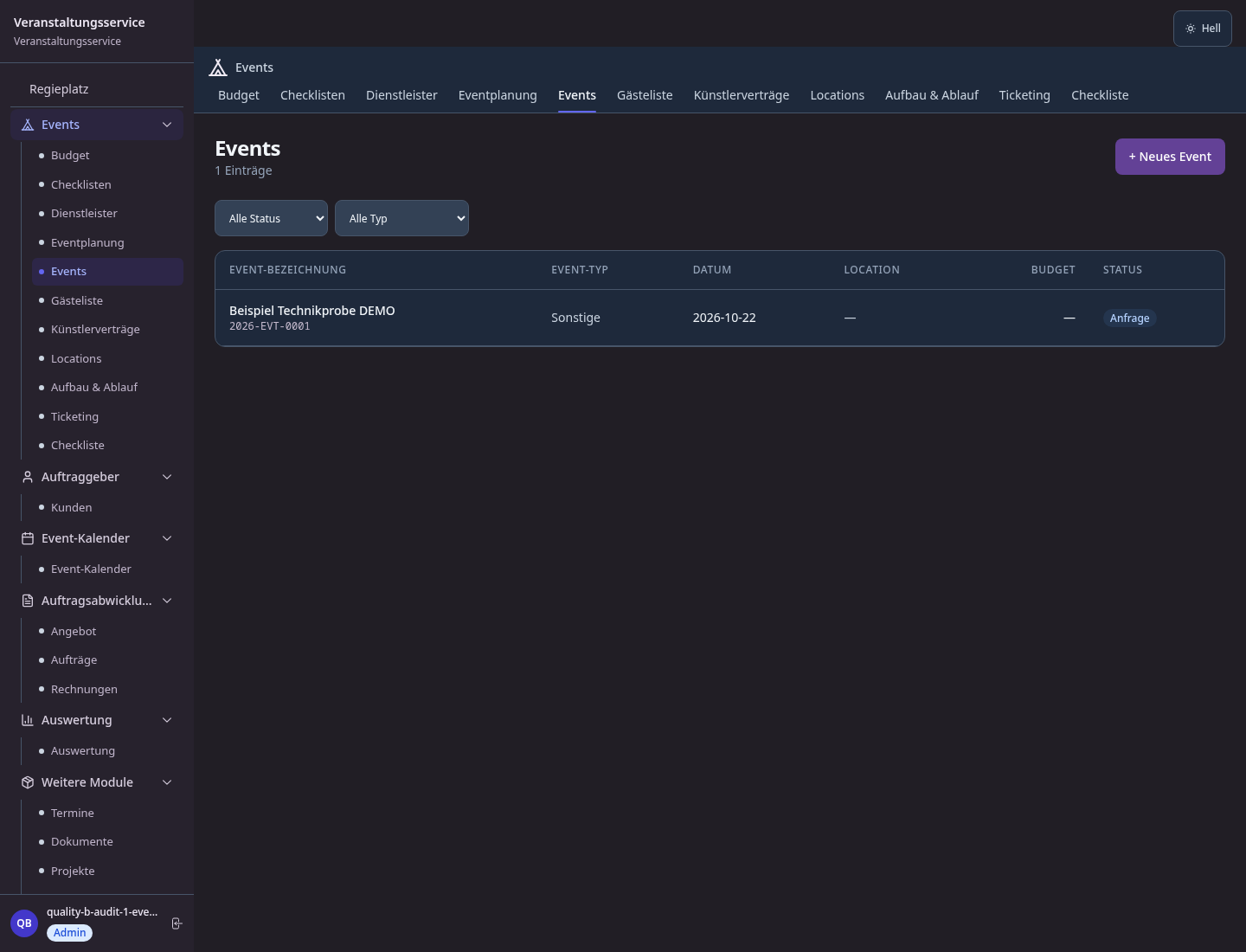
The event needs a name and date. Add venue, guest estimate, budget and manager as soon as those details are known.
The event view records a caterer's service, fee, contact and request status. Mark confirmed only after the caterer actually agrees.
Assign a checklist task with category, owner, due date and priority. Completion should reflect a real check, not an assumption.
How Sektura helps with everyday work
In this fictional planning example, a hired venue expects 80 guests for a company reception. Three days out, the caterer cannot supply the planned starter. The substitute also needs to suit the agreed vegetarian portions.
The manager calls the caterer about the replacement dish, portions, delivery time and any fee change, and records that the answer is still pending.
She asks the client to approve the alternative and checks the revised delivery time with the venue. A due checklist task keeps both replies in view.
After the replies, she updates the event notes and tasks. Supplier status becomes confirmed only after a real commitment; she checks the budget impact herself.
The crew can read the current plan on event day. The supplier's answer and client's decision, rather than a tick in the software, establish what was agreed.
Getting started is simple
Enter its name and date, then add type, venue, start time, expected guests, budget and manager where agreed.
Link each service to the event with contact, fee and honest request status. Confirm the terms directly with each supplier.
Give menu approval, load-in time and sound check an owner and due date; review outstanding items before doors open.
Even a checked item does not prove delivery or acceptance. Keep the team's plan aligned with the replies you have received.
No credit card is needed to start your trial.
Industry solution
Event agencies
Editorial workflow draft — not a product screenshot.
Shortly before a celebration, the caterer reports a change to the agreed menu.
Clarify the change and affected guests with the caterer.
Check the schedule and menu details with the organizer.
Share the agreed version with everyone involved.
The people involved have the agreed menu and schedule.
VIP, group, early bird – time-controlled pricing tiers with automatic switching
Graphically plan tables and seating – guest assignment via drag & drop
Minute-precise timeline for tech, catering and presenters – real-time collaboration
Record dietary requirements per guest, generate kitchen lists – including supplier ordering
Budget plan vs. actual – revenues, costs and contribution margin per event
Less paperwork
These features are included in every sektura solution.
Customer records with full project history for all EventDesk jobs and relevant contact and location information.
Invoices for EventDesk services under local law. Automatic numbering, PDF export and dunning management.
Appointments for EventDesk deployments with GPS address, staff assignment and automatic email reminders.
All EventDesk documents managed centrally: plans, protocols, warranties, certificates and manufacturer documentation.
EventDesk jobs with industry-specific fields, status tracking and automatic cost calculation.
Reports for EventDesk: revenue by service type, utilisation, averages and profitability per job.
Vote on new EventDesk features. Which functions matter most? Your vote counts in product development.
Getting started is simple
Set up service catalogue with prices and SLAs
Configure ticket types & early-bird pricing and enter initial data
Configure interactive seating plan and enter initial data
Configure run of show schedule and enter initial data
Create the first invoice or quote and test the workflow
Before you switch, we check which data we can transfer from your existing system.
Eventbrite · Stova · Cvent · Sweap
Germany · Austria · Switzerland · United Kingdom · France · Spain · Italy · Netherlands · Poland · Portugal · Sweden · Denmark · Norway · Finland · Czechia · Romania · Hungary · Türkiye · Russia · Ukraine · Indonesia · Vietnam · Thailand · Saudi Arabia · China · Japan · South Korea · India · Greece · Croatia · Serbia · Bulgaria · Slovakia · Slovenia · Lithuania · Latvia · Estonia · Albania · Malaysia · Philippines · Bangladesh · Pakistan
04 / Getting started
Choose your industry, country and billing cycle. You will see the corresponding industry price; book add-ons separately when needed.
days free trial
No credit card is needed to start your trial.
No credit card is needed to start your trial.
Add-ons are billed separately in EUR. Displayed prices reflect your selected country and billing cycle.

Industry software for chimney sweeps — sweep districts, emissions measurements, fireplace inspections and invoicing.

Job management for cleaning companies and facility services
Job management for commercial cleaning companies

Case management for private investigators and detective agencies

.jpg)

