Respect privacy and local procedure
Record only necessary personal details, limit staff access and verify all local administrative steps separately.
Industry solution / Funeral Services
For funeral directors supporting relatives while coordinating the case, the service and questions about documents. A family contact, a ceremony draft and a descriptive document list help the team follow up without treating a wish as a confirmed booking.
Pricing & getting started
The case can hold details about the deceased, a relative to speak with and the form of burial being considered.
A selected case can be linked to ceremony details such as proposed date, venue, speaker, music, flowers and order of service.
The document list holds a title, type, reference, date to check and note. It does not establish scanned-file storage or official filing.
How Sektura helps with everyday work
Fictional everyday example: a daughter calls after a death. Her family would like a small farewell, but the venue has not confirmed a time and a needed document is still missing.
Write down the daughter’s contact and only case details that are known.
Note the proposed venue, date and order of service as matters discussed, not as secured bookings.
Describe the missing paper, contact the venue directly and arrange the next conversation with the daughter.
The team can return to the family with specific answers. Outside commitments and official requirements still need separate confirmation.
Getting started is simple
Use invented details and a fictional family contact, with no real client data.
Select that case and enter a possible venue, date and sequence, clearly pending confirmation.
Add its title, type and a note about what must be checked before the next call.
Record only necessary personal details, limit staff access and verify all local administrative steps separately.
No credit card is needed to start your trial.
Industry solution
Funeral directors arranging ceremonies
Editorial workflow draft — not a product screenshot.
A family reports a death and asks to discuss the order of the ceremony.
Record family contacts and their wishes with care.
Review available documents and deadlines requiring clarification with the family.
Agree on the venue, participants and next planning conversation.
Wishes, outstanding documents and discussed dates are recorded for follow-up.
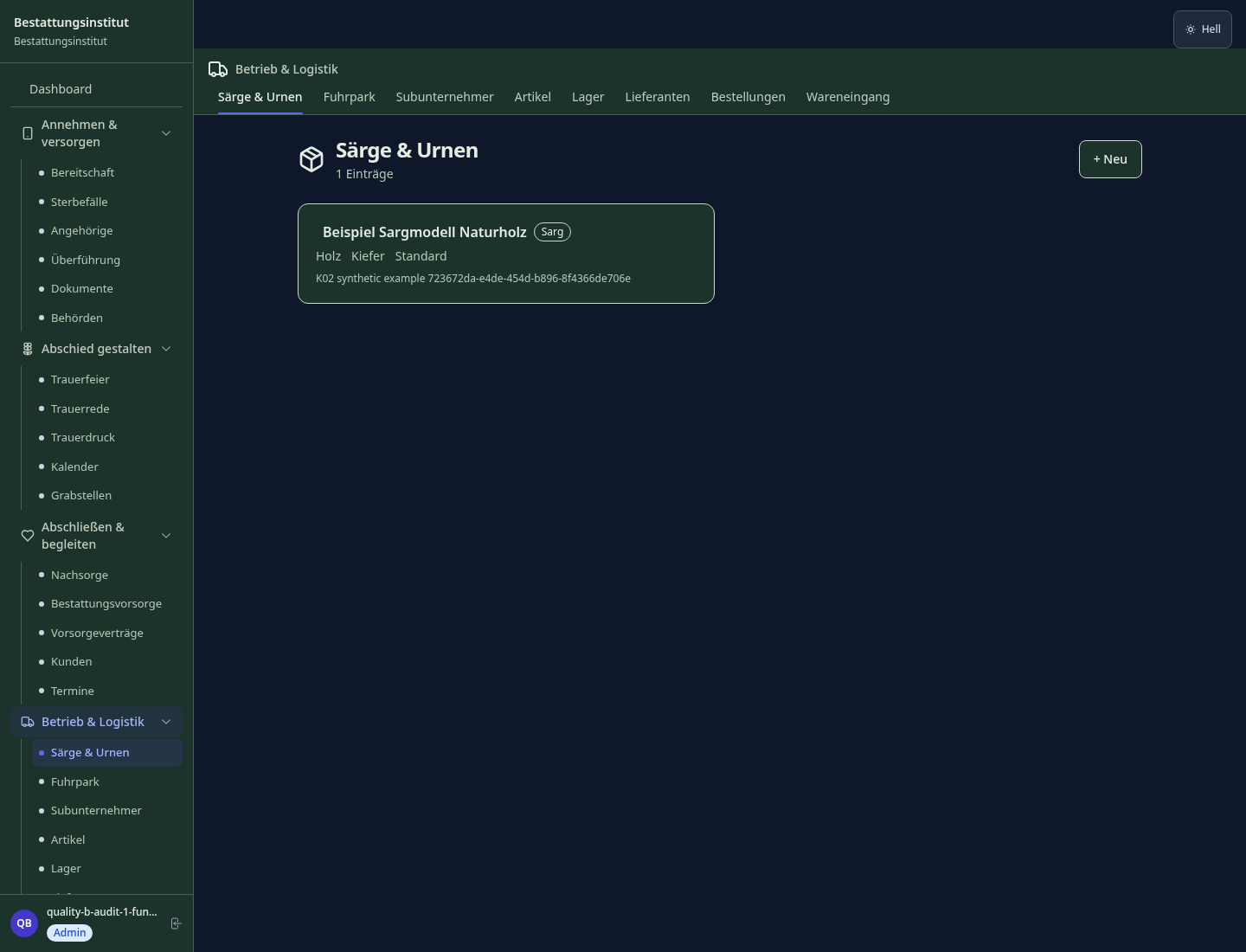
Complete case file: deceased, relatives, deadlines, official procedures digitally
Death certificate, burial permit, cremation authorisation with deadline tracking
Order of service, speakers, music, florist – everything coordinated in one overview
Transparent cost breakdown per funeral law, partial payment and estate billing
Create digital memorial page, design obituary notice and export as PDF
Less paperwork
These features are included in every sektura solution.
Customer records with full project history for all FuneralDesk jobs and relevant contact and location information.
Invoices for FuneralDesk services under local law. Automatic numbering, PDF export and dunning management.
Appointments for FuneralDesk deployments with GPS address, staff assignment and automatic email reminders.
All FuneralDesk documents managed centrally: plans, protocols, warranties, certificates and manufacturer documentation.
FuneralDesk jobs with industry-specific fields, status tracking and automatic cost calculation.
Reports for FuneralDesk: revenue by service type, utilisation, averages and profitability per job.
Vote on new FuneralDesk features. Which functions matter most? Your vote counts in product development.
Getting started is simple
Set up burial types, suppliers and service packages
Configure funeral case management and enter initial data
Configure official documents & deadlines and enter initial data
Configure funeral service planning and enter initial data
Create the first invoice or quote and test the workflow
Before you switch, we check which data we can transfer from your existing system.
Adler Bestattungssoftware · CONVELA · PKF · helloCash
Germany · Austria · Switzerland · United Kingdom · France · Spain · Italy · Netherlands · Poland · Portugal · Sweden · Denmark · Norway · Finland · Czechia · Romania · Hungary · Türkiye · Russia · Ukraine · Indonesia · Vietnam · Thailand · Saudi Arabia · China · Japan · South Korea · India · Greece · Croatia · Serbia · Bulgaria · Slovakia · Slovenia · Lithuania · Latvia · Estonia · Albania · Malaysia · Philippines · Bangladesh · Pakistan
04 / Getting started
Choose your industry, country and billing cycle. You will see the corresponding industry price; book add-ons separately when needed.
days free trial
No credit card is needed to start your trial.
No credit card is needed to start your trial.
Add-ons are billed separately in EUR. Displayed prices reflect your selected country and billing cycle.

Mandate management for tax advisors and tax firms

Farm management for agricultural operations, direct marketers and organic farms.

Management software for animal welfare clubs — shelter management, foster care, adoption placement and donation management.
Project planning, construction supervision, CAD management and client management for architecture firms.

