Agree the handover
Set editing scope, number of final files, selection method and delivery date with the client before the shoot.
Industry solution / Creative & Media
A couple books portraits in the last light after their ceremony. The studio needs a realistic time slot, named photographer, delivery date, a clear way to select previews and a separate record of intended image use.
Pricing & getting started
Keep the client, place, time, photographer and delivery date on the job.
Add preview image URLs to proofing, create a share link and see the client's choices and comments.
Connect the subject, type, scope and duration of image use to the job instead of treating selection as publication consent.
How Sektura helps with everyday work
Fictional example: the couple has ten minutes between the ceremony and dinner for portraits in a park. They want private cards but have not agreed to portfolio use.
The studio records the meeting point, short portrait list and handover date.
The photographer notes the sequence and team in the shoot plan and discusses a rain alternative.
After editing, the studio presents suitable previews for choice and records the agreed use separately.
The couple can select images and the studio can see the job status. Selection alone does not grant publication permission.
Getting started is simple
Use a fictional client, date, location, photographer and delivery date.
Write a short shot sequence and check the calendar.
Use image URLs you may share and check the link, choices and comments before involving a real client.
Set editing scope, number of final files, selection method and delivery date with the client before the shoot.
No credit card is needed to start your trial.
Industry solution
Studios photographing weddings
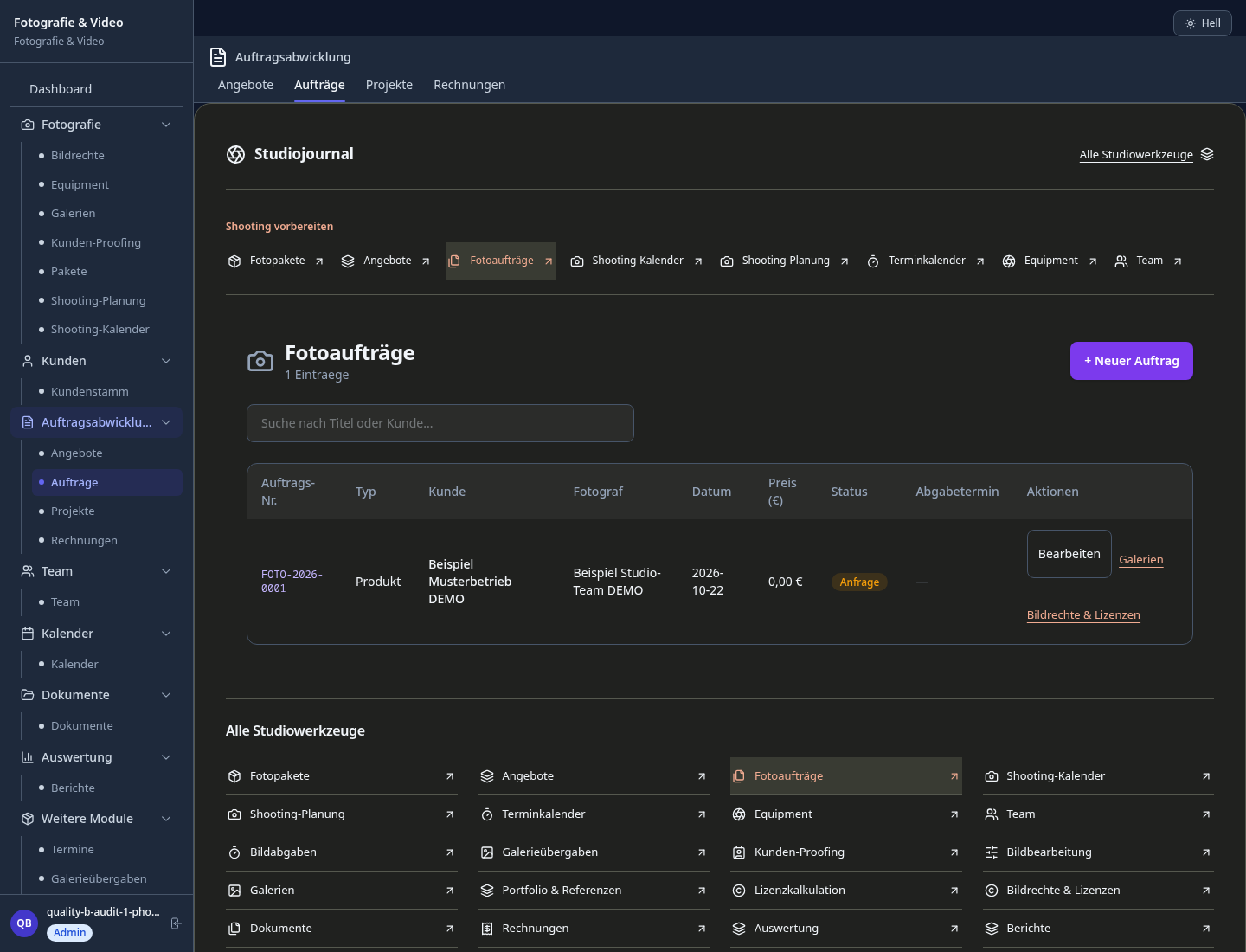
Editorial workflow draft — not a product screenshot.
A couple wants outdoor wedding portraits shortly before sunset.
Discuss the location, time and desired images.
Write down the shooting order and equipment needed.
Clarify intended use of the selected images in writing.
The job holds a shoot plan and discussed image usage.
Golden hour calculator for location shoots — automatic via GPS coordinates
Password-protected galleries with watermarks, download limits and expiry dates
Document commercial, editorial and exclusive usage rights per motif
Create timeline, shot list and style guidelines together with the couple
Delegate subcontract, split hourly fees and automatically settle accounts with colleagues
Less paperwork
These features are included in every sektura solution.
Customer records with full project history for all PhotoDesk jobs and relevant contact and location information.
Invoices for PhotoDesk services under local law. Automatic numbering, PDF export and dunning management.
Appointments for PhotoDesk deployments with GPS address, staff assignment and automatic email reminders.
All PhotoDesk documents managed centrally: plans, protocols, warranties, certificates and manufacturer documentation.
PhotoDesk jobs with industry-specific fields, status tracking and automatic cost calculation.
Reports for PhotoDesk: revenue by service type, utilisation, averages and profitability per job.
Vote on new PhotoDesk features. Which functions matter most? Your vote counts in product development.
Getting started is simple
Set up packages, shoot types and prices
Configure shooting planner & sun position and enter initial data
Configure client gallery with access control and enter initial data
Configure image rights & license tracking and enter initial data
Create the first invoice or quote and test the workflow
Before you switch, we check which data we can transfer from your existing system.
Studio Ninja · Pixieset · HoneyBook · Sprout Studio
Germany · Austria · Switzerland · United Kingdom · France · Spain · Italy · Netherlands · Poland · Portugal · Sweden · Denmark · Norway · Finland · Czechia · Romania · Hungary · Türkiye · Russia · Ukraine · Indonesia · Vietnam · Thailand · Saudi Arabia · China · Japan · South Korea · India · Greece · Croatia · Serbia · Bulgaria · Slovakia · Slovenia · Lithuania · Latvia · Estonia · Albania · Malaysia · Philippines · Bangladesh · Pakistan
04 / Getting started
Choose your industry, country and billing cycle. You will see the corresponding industry price; book add-ons separately when needed.
days free trial
No credit card is needed to start your trial.
No credit card is needed to start your trial.
Add-ons are billed separately in EUR. Displayed prices reflect your selected country and billing cycle.
Software for dance schools – student management, course planning, exam preparation and invoices at a glance.

Project management for graphic designers and design agencies

Campaign management for advertising agencies and marketing service providers
Print order management for print shops, copy shops and digital print businesses